MomentsMoments

Highlights as the action happens

Moments is Mobii’s highlights and short form content product. It finds the key moments in an event from live data and Mobii’s AI, builds them into clips and highlights, and publishes them to every platform while the event is still live.

At a glance

Fast from live moment to post

Clips are ready the moment the video arrives. Find, edit and publish in minutes, with nothing waiting on an encode.

Automation powered by data

Every event tagged in Code, by coders, official data feeds or AI, is ready to search and clip as it happens.

Highlights of any length

Rules set up once build a 30 second clip, a 2 minute summary or a 30 minute package automatically.

Graphics that read the data

Scores, names and statistics fill themselves in for the exact moment each clip shows.

Every available camera angle

Not just the program feed: every camera ingested into Fusion, frame synchronized and ready to cut or stack.

Media intelligence for every team

One home for every clip and highlight, with workspaces and roles so every team works from the same video and data.

The problem

Fans expect highlights now

Audiences follow sport through clips on social media, and they expect them during the event. Traditional workflows log footage by hand and encode every candidate clip before editing starts, so by the time a highlight is ready, the moment has often passed.

Slow to publish

Manual logging and editing mean clips arrive after the conversation has moved on.

Repeated work for every format

Each aspect ratio and each platform means editing the same clip again.

Limited by team size

A small content team can only cut so many clips, so lower profile events and players miss out.

Separate from everything else

Highlights tools often sit apart from production and data, with their own vendor, data feed and integration.

What it does

Highlights built from data

Moments uses the same live data and video as the rest of the Mobii platform. Every moment is already identified and lined up with the video, so finding, editing and publishing take minutes.

Find it from data

Search by team, player, competition, event type and rating. New events appear in the results as they are captured.

Or clip the live feed

Scrub the live footage, mark in and out, and clip the moments no data captures, such as a crowd reaction.

Nothing encoded until export

Every clip is a reference into the original stream, so it is ready the moment the video arrives and costs nothing until it is published.

Highlights of any length

Quick Create builds a 2, 5 or 30 minute highlight from rules set up once, and the result stays editable.

Graphics that read the data

Score bugs, lower thirds and stat panels fill themselves in for the exact moment each clip shows.

Encoded once, published everywhere

One finished edit goes to social channels, websites, broadcasters and partners, in every format they need.

Simple to start, flexible as you grow. Moments works on its own from the video: clip the live feed, edit, brand and publish. With the data from Code, included in every edition, search, automatic highlights, data bound graphics and the AI Assistant all work from the same synchronized record.

Automated highlights

Set the rules once. Moments does the rest.

Moments watches the live data and fires your rules automatically, in real time, publishing short clips or extended highlights in as little as a few seconds.

01

Set the rules once

Your team decides what makes a highlight: which events count, what leads up to them, and how long each clip runs.

02

The moment happens

A coder tags it, an official data feed reports it, or Mobii’s AI detects it from the cameras.

03

Moments fires the rule

The matching rule runs on its own, in real time, building the clip or adding the moment to a highlight of the length you set.

04

Published in seconds

Short clips and extended highlights go out in every format, to social, websites, broadcasters and partners, in as little as a few seconds.

Rule Sets

Highlights that fit any length

Rule Sets give Moments an elastic view of each highlight. The same event can have a short version and a version with its full build up, and Moments picks whichever fits, so one set of rules produces a tight 30 second clip, a 2 minute summary or a fuller extended highlight.

  • Rules tied to the events in your data, for any sport
  • Layers in priority order, each with its own lead in and lead out
  • Related events included, such as the build up to a try
  • Clips placed in event order, with graphics filled from the data
  • Your team can review, adjust or publish by hand at any time
Inside Moments

Find it, build it, publish it

Designed for social, editorial and digital teams, so they can work at the speed of the live event.

Search and edit

Three ways to find it, one timeline to build it

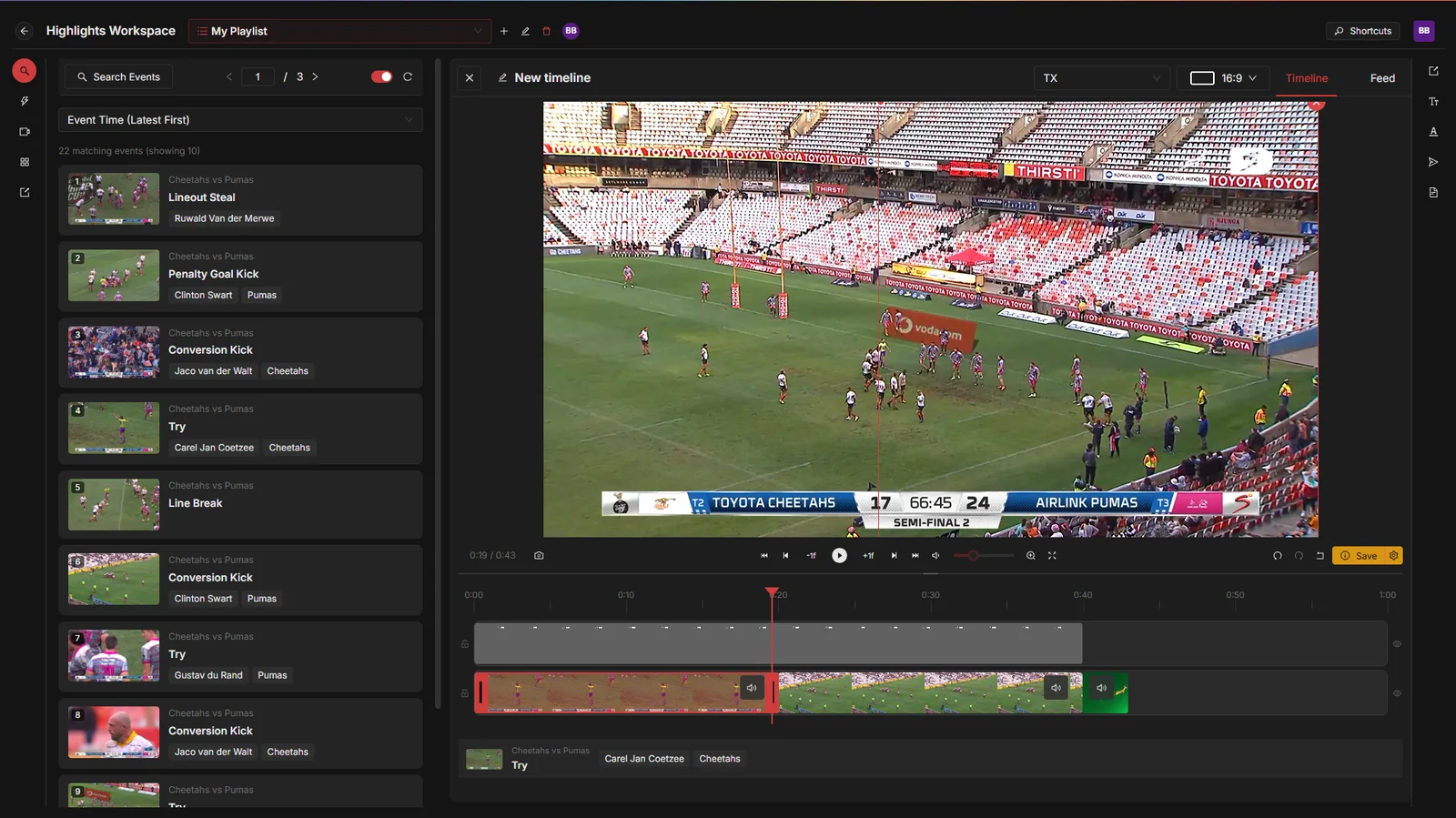
Search the data for what happened, clip straight from the live feed, or ask the AI Assistant. Every result lands on a multiclip timeline with the right lead in and lead out, and dragging a clip edge fills in more video from the source.

  • Search by team, player, competition, event type and rating
  • Clip straight from the live feed, while the event is running
  • Separate tracks for video, audio, graphics and text
  • Detached audio keeps commentary running across cuts
  • Fades, keyboard shortcuts and non destructive edits
Tagged rugby events listed by search in Moments, with a highlight being built on the timeline
Every format

One edit, every channel

One edit is duplicated into landscape, vertical and other aspect ratios. With Moments Max, Mobii’s AI keyframes the crop box automatically, following the action through every clip, and your editors keep full manual control to fine tune the result before it is published.

  • AI keyframes the crop box automatically, clip by clip
  • Fine tune any keyframe by hand, or add your own
  • Landscape for broadcast, vertical for mobile and social
  • Branded, partner ready clips for sponsors and broadcasters
Every camera

Every angle, on one canvas

Moments is not limited to the program feed. Your editors work with every camera feed ingested into Fusion, with no limit on how many, so highlights can show the angles no one saw in the live broadcast. Every angle is frame aligned at ingest, so picture in picture, multiviews and stacked vertical clips bring different cameras together on the same moment with no manual sync.

  • Every camera feed ingested into Fusion, with no limit on how many
  • Show the angles no one saw in the live broadcast
  • Stack angles for vertical content, already frame synchronized
  • Picture in picture, multiview, stacked vertical and custom layouts
Graphics

Graphics that fill themselves in

Approved brand assets are loaded once into the Graphics Library, so every editor works from the same set. Each clip knows the moment it shows, so a data bound graphic placed over it fills in the names, score and statistics for that point in time, and updates from clip to clip as it is stretched across the timeline.

  • Sponsor marks, watermarks and lower thirds
  • Score bugs and stat panels that read the data
  • Pre roll, post roll and calls to action around every edit
  • A graphics editor to create new assets in the library
AI Assistant

Ask for the content you need

The AI Assistant lets your team ask for content in plain language, using the LLM of its choice through the Moments MCP, and builds the clips and timelines from the answer.

  • Search events, create clips and build playlists
  • Run Quick Create and duplicate a timeline to any format
  • Works under the same Workspace and Role permissions as the user
  • Timelines land ready for an editor to review and publish
Moments API

Video for every fan

The Moments API generates replays on request for websites, apps and partners. Combined with Code’s data, every statistic can link to video: a fan clicks a stat and receives a replay of those exact moments, built for them on the spot.

  • Replays on request, without a separate clipping vendor
  • Every statistic linked to the video behind it
  • Used for Shot Callback, where LIV Golf fans replayed any shot from the scorecard

The Moments API inside a web video player: fans watch an instant replay of any golf shot within seconds of it being played.

Workspaces and roles

Private by default, shared with the users and groups you choose, with roles for who edits, publishes and manages exports.

Live presence and notes

See who is working in a Workspace, and leave notes on clips and timelines for the next editor.

Star ratings

Rate clips to surface the strongest moments for the whole team and for automatic highlights.

Text and captions

Titles and emojis, transcripts of the commentary, and subtitles that can be translated on export.

One home for your media

Every clip, highlight and export held in one place for your organization.

Content without the queue

Teams and players get their own login to their clips and highlights, instead of asking the social team.

Built differently

Clips exist the moment the video arrives

Clips in Moments are references into the original stream, located by data already aligned to the video. Nothing is encoded until the final edit is exported.

Cut and encode workflowMoments
Finding clipsLogged by hand, then cut and encoded before editingFound from data, playable as soon as the stream arrives
Changing lengthReturn to the source and cut againDrag the clip edge, and video fills in from the source
EncodingEvery candidate clip is encoded, used or notOnly the final edit is encoded
GraphicsBuilt and updated for each clipData bound graphics fill themselves in for each clip
FormatsEach aspect ratio edited againDuplicate the timeline and change the format
The edge

Clipping tools commonly cut and encode a file for every clip. Moments plays dynamic manifests over synchronized storage, so a clip is never separated from its source.

Distribution

Encoded once, delivered everywhere

Publish straight to social channels, or send higher bitrate files to broadcasters and partners. Large exports split across available encoders, and separate pools keep long packages from holding up quick social clips.

Social platformsWebsites and appsBroadcasters and media partnersMP4 and other files
01

The finished edit

One timeline, in one or more formats.

02

An encoding profile

A lighter profile for social, a higher bitrate for broadcasters and partners.

03

Encoded once

With subtitles if required, then published to every destination.

Your Mobii encoders first

Encoders at your venues export whenever they are not covering a live event. An encoder on a live event is never used.

Your own cloud

With Enterprise, Fusion enabled virtual machines inside your own cloud environment.

Mobii’s infrastructure

For customers without their own encoders or cloud environment.

The edge

Encoders deployed at venues for live work become export capacity when idle. Mobii’s own job queue schedules every export, with live production always taking priority.

Moments with Code

Four sources of data, one record

Moments searches the record Code creates. Whichever source a tag comes from, it lands on the same frame of every camera angle, so Moments treats every source the same way.

Vision

Fusion CV models detect events in the video, and read scoreboards and timing graphics.

Audio

Speech recognition transcribes the commentary into keyword tags and subtitles.

Data Connectors

Third party scoring, timing and telemetry feeds, connected with no development.

Manual coding

Coders tag events, context, links and ratings, live or after the event.

CodeCode

Normalized into one tag based structure

Aligned to the synchronized video timeline

Linked so events carry their context

MomentsMoments

Search, Quick Create, data bound graphics and the AI Assistant all read the same record, whichever source it came from.

Moments on its own

Works from the video

  • Clip from the live feed with no data at all
  • The full timeline, every format and canvas layouts
  • Graphics Library, encoding profiles and publishing
Moments with Code

Works from video and data

  • Events from every source become search filters
  • Linked tags and ratings drive automatic highlights
  • Data bound graphics and AI Assistant requests

Most deployments combine sources: a Data Connector supplies live scoring, vision and audio add detections, and coders add the context and ratings a feed does not carry. The data sources available depend on the edition.

In production

Moments at work

Highlights for the South African Rugby Union’s communications team, built from SARU’s own video and data.

Who it is for

Built for every content team

From a club social team posting during the match to a league serving broadcast partners and fans at scale.

TeamTypical challenge, and what Moments delivers
Social and communications teamsPosting clips fast enough to join the live conversation. Moments publishes during the event, in the right format for each channel
Editorial and production teamsBuilding match highlights and player packages under time pressure. Moments finds them from data and assembles them in minutes, or automatically
Media and partner teamsDelivering assets to broadcasters, sponsors and partners. Moments makes branded, partner ready clips from one edit
Digital product teamsAdding video to statistics on websites and apps. The Moments API serves replays on request, linked to the data
Smaller clubs and federationsA small team and no data vendor. Moments finds clips from data the team tags itself, with very little effort
Editions

Core, Plus and Max

Compare what each Moments edition includes. Start with what you need and move up as you grow.

EditionsEach edition includes your Prism tenant and the matching edition of Code.Moments CoreClips from data your team createsIncludes Code CoreMoments PlusAdds clips from your official data feedsIncludes Code PlusMoments MaxAdds AI that finds and frames moments, and the AI AssistantIncludes Code Max
Find
Search by team, player, competition, event type and rating
Moments from your team’s tagging
Moments from your official data feeds
Search across official statistics
Moments found by AI from the cameras, no tagging
AI Assistant: ask for every save from this weekend
Build
Timeline editing with lead in, lead out, transitions and audio
Graphics Library, filled from your data
Quick Create highlights of a set length
Highlights assembled across many events
Format and publish
One edit in landscape, vertical and other formats
AI framing keeps the action in frame
Publish to social, broadcasters, websites and partners
Teams
Workspaces, groups and roles
Code edition includedCorePlusMax
Coder seats2510

Add as you need

Moments APIReplays on request for your websites, apps and partners.
Additional coder seatsBeyond the seats your edition includes.
Additional Data ConnectorsMore official feeds, one per source.

Priced by use

Exports encoded in the cloud are metered per minute. Exports on your own Mobii encoders carry no charge.

Holding more than one Mobii product, you pay for Code once, at the highest edition you hold.

Available on monthly, annual or multi year terms, on Mobii Shared Services or, with Enterprise, inside your own cloud. Talk to us about pricing.

FAQ

Questions about Moments

Something else you want to know? Talk to us.

How quickly can we publish clips?

While the event is still live. Every moment is already identified and lined up with the video, so finding, editing and publishing take minutes.

Do we have to tag every moment ourselves?

No. Moments works from your team’s tagging in Core, adds your official data feeds in Plus, and with Max finds moments from the cameras with no tagging at all.

Do we need to edit each format separately?

No. One edit is duplicated into landscape, vertical and other aspect ratios. With Moments Max, AI framing keeps the action in frame for mobile.

Where can we publish?

To social channels, broadcasters, websites and partners. The Moments API adds replays on request in your own websites, apps and partner platforms.

Does every clip have to be encoded?

No. Every clip stays a reference into the original video until the final edit is exported, so nothing is encoded twice. Exports run on your Mobii encoders when they are free, in Mobii’s cloud, or with Enterprise inside your own cloud.

Is Code included?

Yes. Each edition includes the matching edition of Code, so the data Moments searches is part of the package, along with your Prism tenant.

Where does Moments run?

Editing and publishing run in the cloud. Exports run on your Mobii encoders when they are not covering a live event, in Mobii’s cloud, or with Enterprise inside your own cloud, so a long package never holds up a quick social clip.